📘 Introduction
Why SEO title length matters for rankings and CTR.
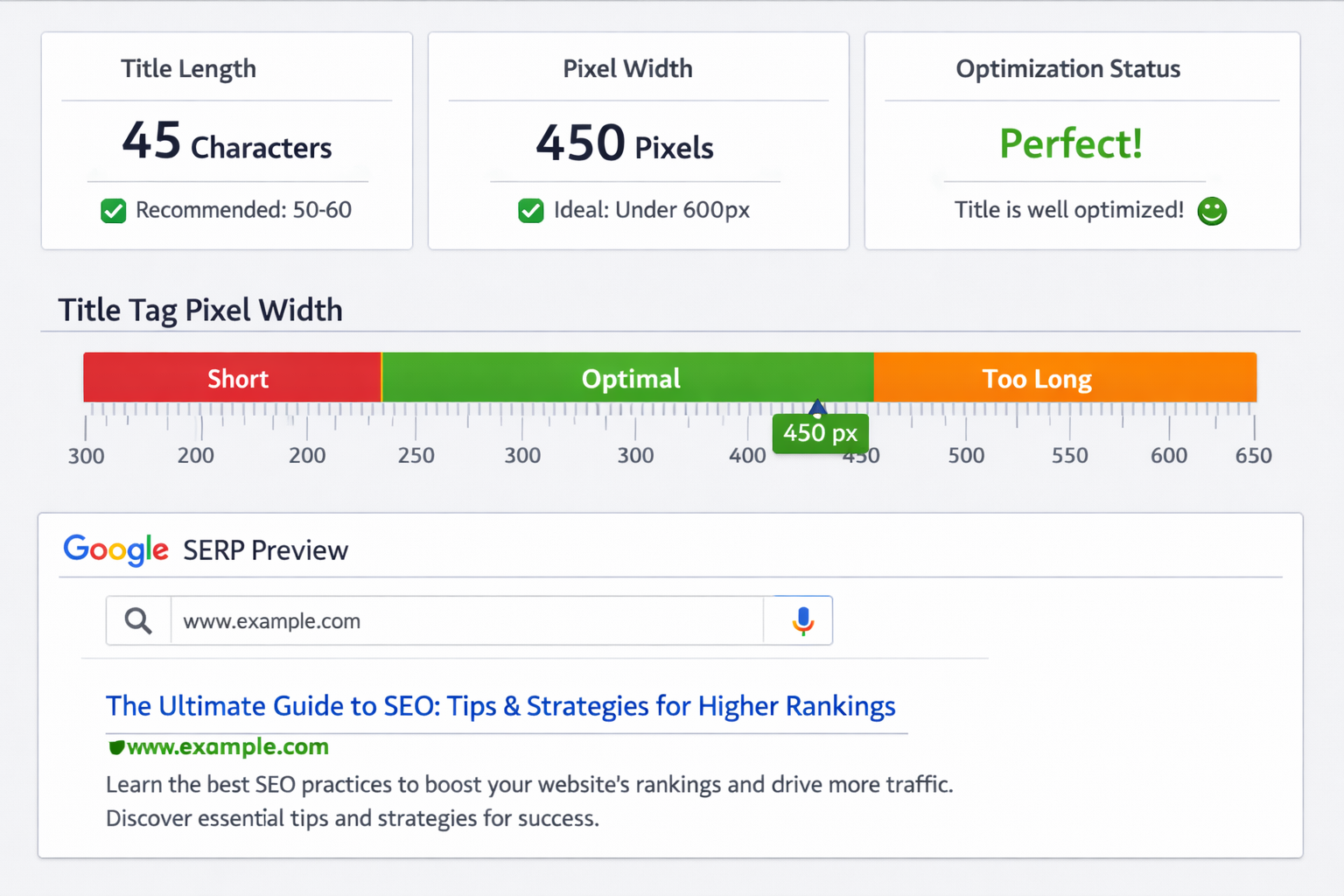
SEO titles play a critical role in how your webpages appear in search engine results. They are often the first element users notice, directly influencing click-through rates and perceived relevance. If a title is too long, Google may truncate it, cutting off important keywords and reducing clarity. If it is too short, you may miss opportunities to include valuable search terms. The SEO Title Length Checker helps website owners, marketers, and SEO professionals instantly verify whether their titles fall within recommended limits. By providing clear feedback, the tool ensures your titles are optimized for both search engines and human readers.
📏 SEO Title Length Checker (Tool)
Check whether your page title is optimized for Google search results. Ideal SEO title length is 50–60 characters.
Table of Contents
⚡ Quick Summary
Key insights about the tool.
The SEO Title Length Checker is a lightweight utility designed to measure and validate title tag length against Google’s display limits. It provides immediate feedback without requiring logins or technical setup. The main takeaway is simple: properly sized titles look better in search results and perform better with users.
Key Takeaways
- Instant title length check
- Google-friendly limits
- No signup required
- Easy to use
- Improves SERP performance
📖 What Is This Tool?
Definition of the SEO Title Length Checker.
The SEO Title Length Checker is an online tool that analyzes the length of your meta title to ensure it fits within Google’s recommended display range. It helps prevent truncation and ensures that your most important keywords remain visible. This tool is especially useful during content creation, on-page optimization, and SEO audits.
Tool Definition
- Checks title length
- Prevents truncation
- Optimizes SERP display
- Browser-based
- Fast and accurate
🎯 Who This Tool Is For
Ideal users of the tool.
This tool is designed for SEO professionals, digital marketers, bloggers, content writers, and website owners. Anyone responsible for publishing web pages can benefit from checking title length before going live. It is suitable for both beginners and experienced SEO practitioners.
Ideal Users & Customer Profiles
- SEO professionals
- Digital marketers
- Bloggers
- Content writers
- Website owners
😖 Core Pain Points This Tool Solves
Problems caused by incorrect title length.
Many websites suffer from truncated or poorly optimized titles because creators rely on character count alone. Google measures titles in pixels, not just characters, leading to unexpected cutoffs. This tool removes guesswork and ensures predictable SERP display.
Problems Users Face
- Title truncation
- Low CTR
- Keyword loss
- Inconsistent SERP display
- Manual checking errors
- SEO inefficiency
- Wasted optimization effort
✅ How This Guide Solves Those Pain Points
How the tool improves title optimization.
The SEO Title Length Checker provides instant feedback so users can adjust titles before publishing. This ensures consistency and better visibility in search results. By using the tool, users save time and improve SEO outcomes.
How This Content Helps
- Eliminates guesswork
- Improves visibility
- Boosts CTR
- Supports SEO audits
- Speeds up optimization
- Improves content quality
- Ensures consistency
💡 Why Use This Tool
Value proposition of the tool.
This tool ensures your titles are optimized for both users and search engines. It is fast, reliable, and easy to use. It fits seamlessly into any SEO workflow.
Value Proposition
- Fast results
- Accurate limits
- Free to use
- No login
- SEO-friendly
⏰ When to Use This Tool
Best times to check title length.
Use this tool before publishing new content, during SEO audits, or when updating existing pages. It is also useful during content planning.
Best Use Scenarios
- Before publishing
- SEO audits
- Content updates
- Campaign pages
- Blog optimization
🛠️ How to Use This Tool
Steps to check title length.
Enter your SEO title into the tool, review the feedback, and adjust if needed. The results appear instantly. No technical knowledge required.
Usage Steps
- Enter title text
- Check length
- Review feedback
- Adjust title
- Publish confidently
🏆 Benefits of Using This Tool
Advantages of optimized title lengths.
Optimized titles improve search visibility and user engagement. This tool helps achieve consistent results. It supports long-term SEO success.
Key Advantages
- Higher CTR
- Better SERP display
- SEO accuracy
- Time savings
- Free access
- Beginner-friendly
- Professional results
- Consistent optimization
- Reliable output
- Improved rankings
🔒 Privacy, Security
User privacy and trust.
The tool does not store or track user input. All checks are processed securely. Privacy and transparency are core priorities.
Your Data Safety
- No data storage
- No tracking
- Secure processing
- Transparent usage
- Privacy-first design
- Trusted provider
Also Known As
Alternative terms for SEO title checking tools.
FAQs
What is the ideal SEO title length?
Typically 50–60 characters.
Does Google use pixels or characters?
Pixels.
Is this tool free?
Yes.
Do I need to log in?
No.
Can beginners use it?
Yes.
Does it store my data?
No.
Is it mobile-friendly?
Yes.
Does it improve CTR?
Indirectly, yes.
Can I use it for audits?
Yes.
Does it work instantly?
Yes.
Is it accurate?
Yes.
Who should use it?
SEO professionals and site owners.
Does it support long titles?
Yes.
Is it beginner friendly?
Yes.
Does it help rankings?
Yes, indirectly.
Can bloggers use it?
Yes.
Is it safe?
Yes.
Does it require setup?
No.
Is it browser-based?
Yes.
Who built it?
The Infoage Solutions.
🔧 Other Seo Tools
🗂️ Tool Categories
No categories available